

Hackers Slipped a Spy Program Into Two Free Windows Tools. Deleting the Apps Won’t Remove It
Poisoned copies of Q-Dir and DesktopOK came straight from the developer’s own website and even its updates, and security researchers found notes written in Chinese inside the code.
If you use a Windows computer and ever went looking for a better file manager, there’s a decent chance you ran into Q-Dir. It’s free and shows four folders at once. Its sister program, DesktopOK, remembers where your desktop icons go when you plug in a new monitor. Both are the kind of handy little tools IT workers and tinkerers install without a second thought.
This month, that trust got used against them. AhnLab, one of South Korea’s biggest security companies, confirmed on Nov. 26 that some Q-Dir and DesktopOK installers sitting on the developer’s own official website, SoftwareOK, had been swapped for poisoned copies. Those copies installed the real program, so everything looked normal on screen, while quietly pulling down a spy program in the background that lets a stranger take over the computer.
And here’s the part that should make anyone stop and check: uninstalling the app does not get rid of it.
The download looked normal, and that was the trick
Most of us were taught the same rule about software: skip the sketchy download sites and get it straight from the maker. In this case, the maker’s site was the problem. AhnLab’s researchers wrote that the bad files were “delivered to users through SoftwareOK’s official distribution path, not through unofficial repositories or advertising pages.”
It gets worse. People who already had a clean copy installed weren’t safe either. AhnLab found “logs showing that malicious files were generated even during the update process of previously installed legitimate programs.” In plain English, clicking “update” on a program you trusted could have been enough.
The tampered versions confirmed so far are Q-Dir 12.83, 12.84 and 12.85, and DesktopOK 12.82 and 12.85. AhnLab warns that not every copy of those versions was bad, and that anyone who installed or updated either tool during the attack window should treat the computer as possibly compromised, whatever version number shows up.
The poisoned installer carried a genuine, digitally signed copy of the real program inside it. That signed copy is what you saw open on your screen. Meanwhile, the installer reached out to a server, grabbed a tool for unzipping files plus a complete Python package, and set it all up in a folder made to look like it belongs to Windows: C:\ProgramData\Microsoft\DeviceSync\b2. Because the package brings its own copy of Python, it runs even on machines that never had Python installed.
To keep itself alive after a restart, it creates a scheduled task named “MicrosoftEdge_dcntel,” another name picked to blend in with things Windows already runs.
What the spy program can do once it’s in
According to AhnLab’s breakdown, whoever controls the program can run commands on your computer, run their own code, upload and download files and take screenshots of whatever is on your screen. It also gathers details about your system and sends them back to its operators.
One feature shows how careful the attackers were. The program carries a list of 1,206 process names belonging to antivirus and security products, from Korean brands like AhnLab V3 to big American names like CrowdStrike, SentinelOne, McAfee, Symantec and Malwarebytes. It checks which ones are running and reports back, so the attackers know what kind of defenses they’re up against before making their next move.
AhnLab also found something about who might be behind it. The researchers said “evidence of Chinese language use was found in comments within the Python code and in the list of identified security products,” which, in their words, “suggests that the malware developers or threat actors may be associated with a Chinese-speaking environment.” That stops short of naming a country or a group, and nobody has claimed the attack.
Researcher Kostas of Thrunting Labs reported seeing what looked like a real person poking around one infected machine afterward, running commands to map out the system and the network and checking whether ToDesk, a remote-control program popular in China, was running.
Seventeen days of warnings
This didn’t come out of nowhere. Independent researchers were sounding the alarm for more than two weeks before AhnLab’s report.
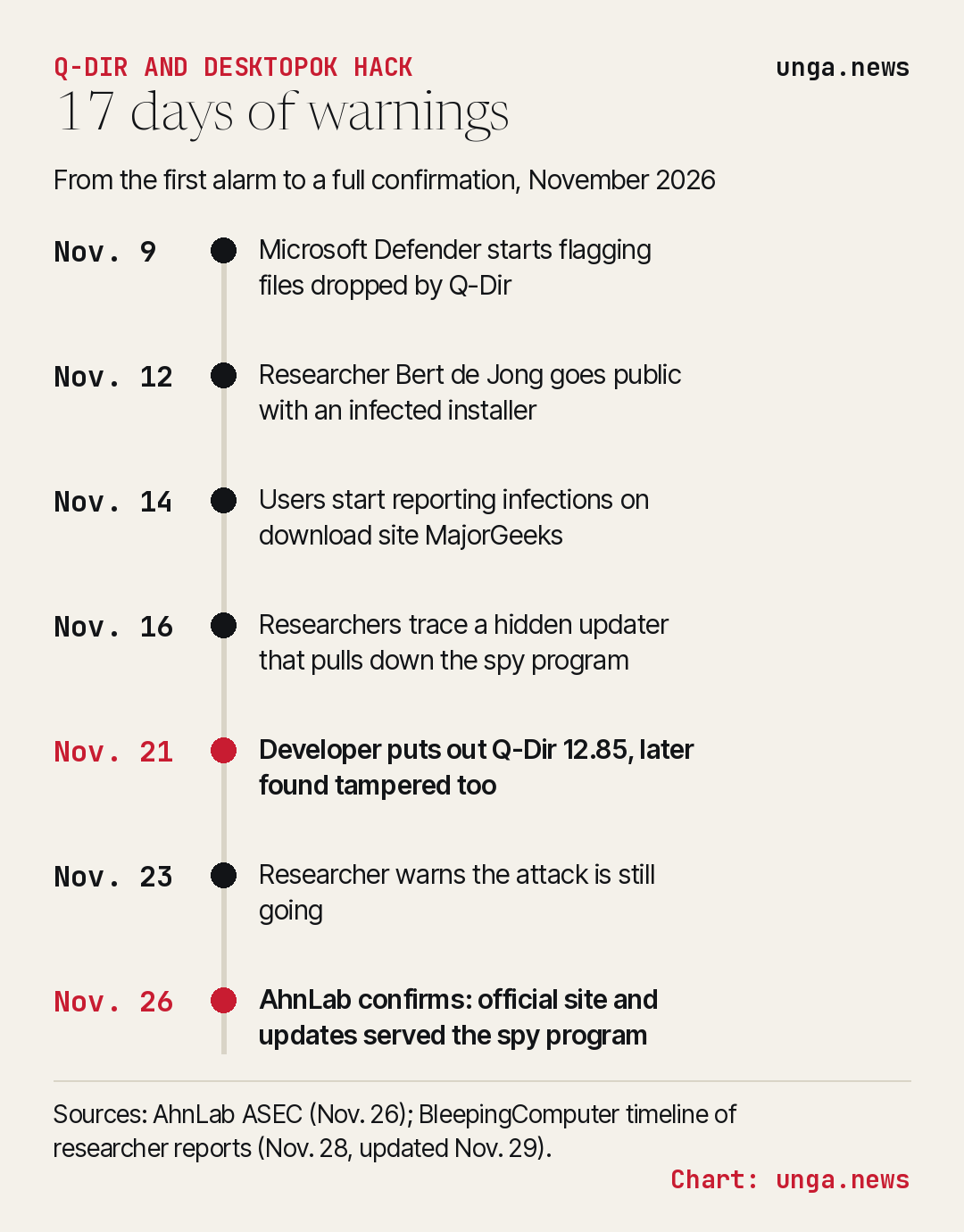
Microsoft’s own Defender started flagging files dropped by Q-Dir on Nov. 9, according to a researcher who goes by Aura. On Nov. 12, Bert de Jong of HOB ICT Security went public after finding that a Q-Dir 12.83 installer ran a hidden program with full system-level control. SoftwareOK later confirmed to him that the bad file had come from its own website, where it sat for a while before a clean copy replaced it. By Nov. 14, users were reporting infections on the popular download site MajorGeeks, whose staff said they couldn’t reproduce the problem.
Then the developer put out Q-Dir 12.84, described as a fix for a Windows Defender false alarm with “no virus was actually present,” according to Aura. AhnLab’s list now includes 12.84 among the tampered versions. On Nov. 21, Q-Dir 12.85 came out, and two days later Aura warned the attack was still going. That version is on AhnLab’s list too.
AhnLab says it still can’t tell how the real installers got replaced or exactly how long the bad ones were up. Developer Nenad Hrg, who builds both tools, had not answered BleepingComputer’s questions as of its latest update.
How to check your own computer
If you’ve never installed either program, you’re fine. If you have, especially in November, don’t just uninstall and move on. AhnLab’s advice boils down to a few steps:
First, look for a folder called “b2” under C:\ProgramData\Microsoft\DeviceSync, or under C:\ProgramData\DeviceSync. Second, open Task Scheduler and look for a task named “MicrosoftEdge_dcntel” under a folder called UPnp. Third, update your antivirus and run a full scan, not a quick one. If you find any of it, unplug that computer from the internet and assume anything typed on it lately, including passwords and banking logins, could be in someone else’s hands.
Going forward, SoftwareOK posts a fingerprint code, called a SHA-256 hash, for each download. AhnLab says the hashes on some tampered files didn’t match the ones on the page, which means anyone who checked would have caught it. Windows can show a file’s fingerprint with one PowerShell command, Get-FileHash, followed by the file name. It takes ten seconds.
That’s the lesson here. Free software built by one person can be wonderful, but a one-man shop is also an easy target, and “I got it from the official site” isn’t the safety guarantee it used to be. Checking is on all of us now.
Sources
- AhnLab ASEC — Software Supply Chain Attack via the Official SoftwareOK Website: Tampering with Q-Dir and DesktopOK Installation Files (Nov. 26, 2026)
- BleepingComputer — Q-Dir and DesktopOK Windows utilities compromised to push Python RAT (Nov. 28, 2026, updated Nov. 29)
- SoftwareOK — Q-Dir official download page and version history