

No Coding Needed: Claude Now Turns a Plain Request Into a Real App on Your Computer
Describe a timer, a photo renamer or an order tracker, and Claude builds it and installs it on your Mac or Windows PC. You decide how much of your computer it can touch.

For most people, getting a custom computer program has always meant one of three things: pay a developer, pay a monthly subscription for something close enough, or learn to code. Starting this week, a lot of people get a fourth option. Ask for it in plain English.
Anthropic, the company behind the Claude chatbot, is rolling out a feature it calls “Install as app” in the Claude programs for Mac and Windows. You describe a small tool, Claude builds it, and with a couple of clicks it lands on your computer with its own icon and its own window, sitting in your Applications folder or Start menu like anything else you’d download. The company announced it on Nov. 24, and it’s in beta on every plan, from the free tier up to big business accounts.
The examples Anthropic gives are refreshingly ordinary. “Make a Pomodoro timer that lives in my menu bar.” “Make a small Mac app that reminds me to stretch every hour.” “Make a Windows app that renames the photos in a folder by date.” That last one alone would save a lot of moms a lot of Sunday afternoons.
From a chat window to your desktop
Claude has been able to whip up these little programs, which it calls artifacts, for a while. Until now they lived inside the chatbot. You opened Claude, found the thing, and used it in there. Anthropic says people kept turning them into everyday work tools anyway, like “a meeting prep page that regularly pulls from their calendar and email, or a tracker for the orders that need to ship that day.”
Now those tools can leave the nest. An installed app keeps running in its own window, can pop up a notification while you’re working in something else, and can park itself in the Mac menu bar or the Windows system tray. If somebody on your team edits the original, the installed app updates on its own. There’s no packaging, no signing certificates, no separate login. It runs on your Claude account, and anything it asks Claude to do counts against your plan’s usage limits.
To show off what’s possible, Anthropic says its own staff built a layered image editor, a file manager, a folder organizer that sorts your stuff by rules you set, a command-line terminal with Claude riding along to explain things, and a little gauge that shows how hard your computer is working. Those are company showpieces, not independent tests. Nobody outside Anthropic has measured how well the average homemade app holds up.
The permission slip is the part to read
Anything that can run on your computer can also mess with your computer, so the real story is in the fine print, and Anthropic deserves credit for putting the user in charge of it. Its help page lays out three levels of trust.
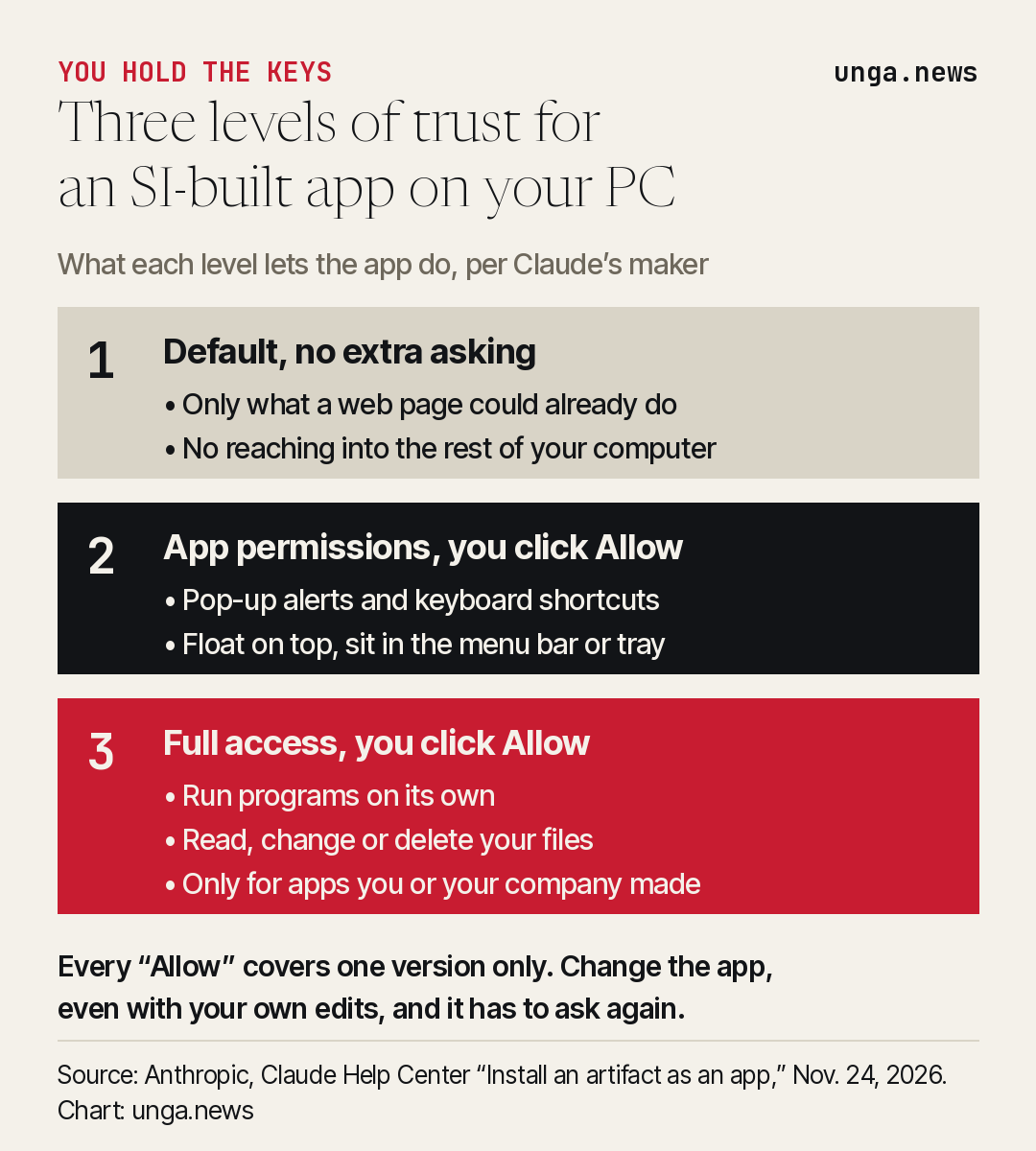
Out of the box, an installed app can only do what a web page could do. To go further, it has to ask, one feature at a time, and you answer “Allow” or “Don’t allow.” The top tier, full access, is a different animal. In Anthropic’s own words, it lets an app “run programs and read, change, or delete your files without asking each time.”
There are some smart guardrails on that. A yes only covers the version of the app you said yes to, so after any update, “including your own edits,” it has to ask again. A no sticks until you change it. On personal plans, nobody but you can be trusted with full access, and Claude “generally doesn’t allow apps to request full access” when someone else wrote part of the app or it can’t tell who made it. Uninstalling an app wipes the permissions you gave it.
Businesses get even tighter defaults. On Team accounts the feature is on, but full access stays off until an administrator flips it. On Enterprise accounts the whole thing is off until the account owner turns it on. Organizations set up for medical privacy rules can’t use it at all, and full access is blocked in Anthropic’s K-12 school versions.
Nobody is checking these apps but you
Here’s the warning Anthropic prints in bold, and every reader should take it seriously: “Anthropic doesn’t review apps before you install them.” That’s a big difference from the app stores most people are used to, where Apple or Microsoft at least looks over a program before it gets on your phone or PC. With these, you are the review board.
The help page also flags a sneakier risk. “If an app loads code from another site, that code can change without a new request.” In plain terms, an app you approved on Monday could quietly behave differently on Friday if part of it pulls from somewhere else on the internet. Anthropic says an app from outside your organization, or one whose maker Claude can’t identify, shows a warning when it asks for permissions. Heed it.
So the common-sense rule writes itself. Build your own little tools and enjoy them. Be very slow to hand full access to anything a stranger shared with you, no matter how slick it looks. And if an app wants to read and delete files when all it’s supposed to do is remind you to drink water, that’s your answer.
For now it doesn’t work on Linux, phones or the web version of Claude, and you have to be online and signed in to open an installed app.
Software for the rest of us
For decades the people who could build software got to decide what software the rest of us used. A plumber who wanted a simple job tracker, a church secretary who wanted a sign-up sheet that sends reminders, a dad who wanted a chore chart for the kids, all of them had to take whatever a software company decided to sell, usually on a monthly fee. Tools like this hand that power back to the person sitting at the keyboard.
That’s a free-market win, and it’s the kind of competition that keeps every SI company honest. Claude, OpenAI’s ChatGPT, Google’s Gemini and Elon Musk’s Grok are all racing to be the assistant people actually rely on day to day, and the prize goes to whoever makes regular folks more capable without making them less safe. Anthropic’s version puts a big, clear “Allow” button between its SI and your files. The rest is up to you.
Sources
- Claude by Anthropic — Turn artifacts into Mac and Windows apps (Nov. 24, 2026)
- Claude Help Center — Install an artifact as an app
- MacRumors — Claude Now Lets You Install Artifacts as Desktop Apps (Nov. 25, 2026)
- The Verge — Anthropic rolls out “Install as app” on Mac and PC for Claude’s mini-app Artifacts