

Windows Is Getting a New Built-In SI That Runs on Your Own PC. It Leaves an Invisible Tag.
Microsoft is replacing the SI that summarizes and rewrites text on Windows laptops with a smaller model that can read about nine times more at once. Its text can also carry a hidden marker.
If you own a newer Windows laptop, there is a small SI living inside it that most people never think about. It is the thing that summarizes a long article or rewrites a sloppy email into something your boss can read, and it does that work on the computer itself instead of shipping your words off to a data center. Microsoft just told developers it is pulling that SI out and putting a new one in.
The new model is called Aion Instruct, and it replaces one called Phi Silica. Microsoft laid out the switch Friday in a post on its Windows developer blog. Test machines in the Windows Insider program start getting it on Nov. 20. Regular retail PCs follow in late January, and that is when Phi Silica gets removed for good.
A Smaller Model That Can Read Much More
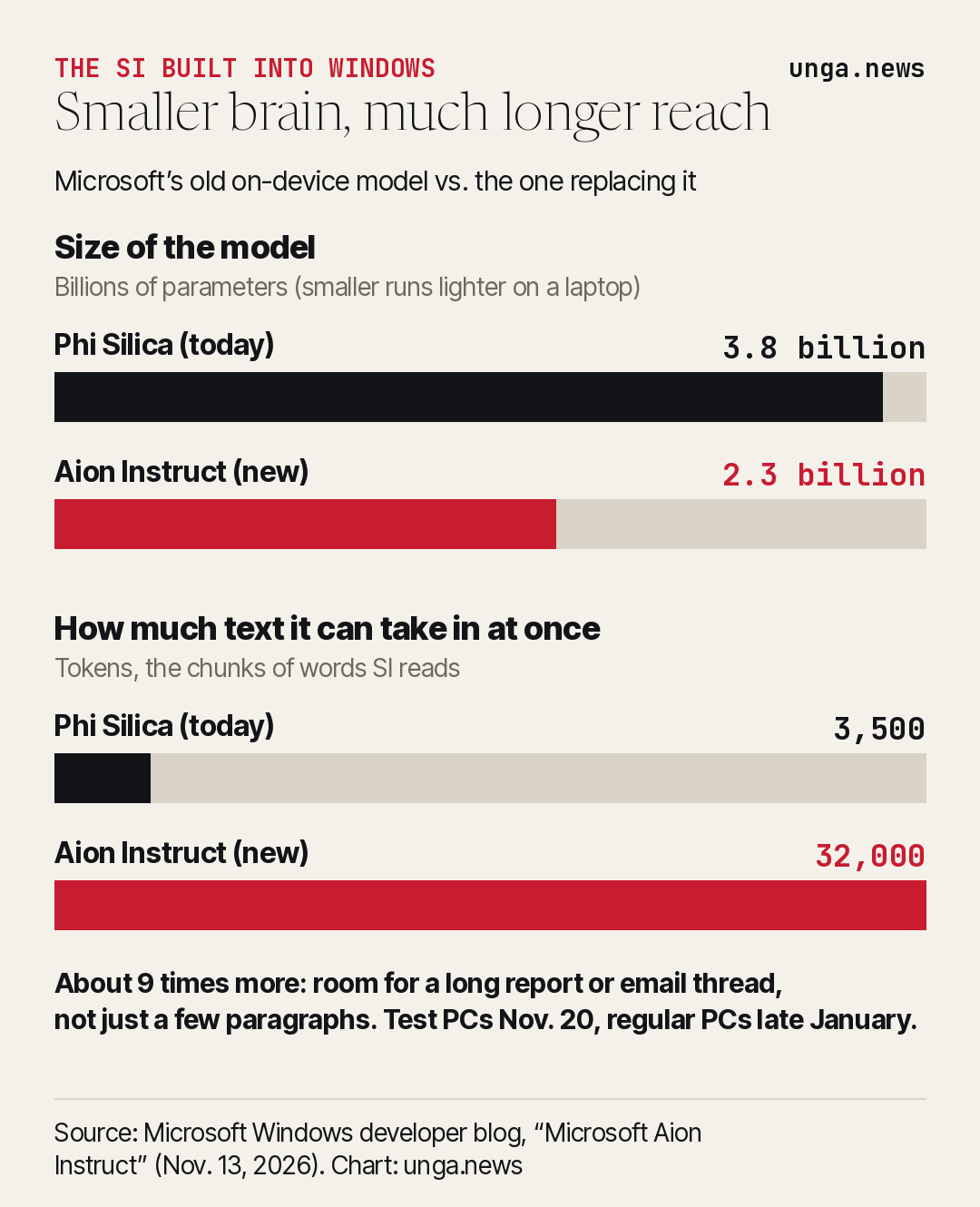
The headline number is a strange one at first glance. The new model is smaller. Phi Silica has 3.8 billion parameters, the internal settings an SI learns during training. Aion Instruct has 2.3 billion, about 40% fewer. Normally a smaller model means a weaker one.
Microsoft’s bet is that size is not the problem people actually run into. The bigger change is how much text the model can take in at once. Phi Silica tops out around 3,500 tokens, the word chunks SI systems read, which is a few pages at best. Microsoft’s own documentation for Phi Silica admits that small window “constrains how much text it can process at once” and hurts on long documents and back-and-forth chats. Aion Instruct raises that ceiling to 32,000 tokens, roughly nine times more.
In plain terms, the old model could summarize a long email. The new one should be able to handle a whole email thread, a long contract or a meaty report in one pass, without anything leaving the laptop.
Microsoft promises “more responsive language model experiences” and “improved performance and use of device resources.” Those are the company’s claims. It has not published speed or quality test results yet, and says a technical report is “coming soon.” Until outside testers get their hands on it, the size and text-limit figures are the only hard numbers on the table.
Where You Will Notice It
On Copilot+ PCs, the higher-end Windows laptops with a dedicated SI chip, Phi Silica powers the summarize, bulleted-list and rewrite buttons in Click to Do, the tool that lets you act on whatever is on your screen. Microsoft has also used it for on-device rewriting and summarizing in Word and Outlook. Those features are supposed to keep working after the swap. Microsoft says “most existing AI-powered features will continue to work” as they move to the new model.
The other change is reach. Microsoft is bringing Aion Instruct to laptops and desktops with popular graphics cards, naming Nvidia’s RTX line and AMD’s RDNA 4 Radeon cards, not just the Copilot+ machines with the special chip. Hardware support will roll out “in stages,” the company says, as each setup passes its quality checks.
There is also a practical win for the small software makers who build on Windows. Today, an app that wants to tap Phi Silica has to request an unlock token from Microsoft through a form. Microsoft says that requirement goes away with Aion Instruct, with removal targeted for January. That should mean more everyday apps, from note-takers to email clients, can use a private, on-device SI without asking permission first.
Running SI on your own machine matters for a simple reason. Your text stays with you. The summary of your medical bill or your kid’s school email does not have to travel to a server farm and back. It also works on a plane with the Wi-Fi off.
The Invisible Tag in the Text
Buried in the developer notes is the part regular users should know about. Microsoft says it has “added invisible watermarking to Aion Instruct to fulfill Text Provenance requirements in specific regions.”
Microsoft’s documentation on the watermark spells out how it works. Since October, text coming out of some of Windows’ built-in SI writing tools for apps, including its summarize and rewrite functions, can carry a hidden marker. It is a string of four invisible characters, a zero-width space, a combining grapheme joiner, a word joiner and another zero-width space. You will not see it on screen. A single response can carry it zero, one or several times, and Microsoft says where it lands varies from one response to the next, with the placement rules changing over time.
Microsoft did not say which regions require it. The European Union’s SI Act is the best-known law that asks makers of SI systems to mark generated text in a machine-readable way. Microsoft also put the burden on app makers: “You are responsible for ensuring that your app satisfies the requirements for marking AI-generated content that apply to it,” the company warns developers who might be tempted to strip it out.
For most people, the tag will do nothing. Microsoft notes it can affect text selection and cursor movement, and it can trip up apps that expect clean code or data from the model. It is also not a lie detector. Characters that can be inserted can be deleted, and Microsoft’s own guide explains how apps should handle them. A school or employer looking for a hidden marker in a pasted essay could find one, or find nothing, and neither result proves much on its own.
Still, it is a quiet change to a tool that ships inside the most-used desktop operating system in the world, and Microsoft put it in a developer blog rather than a consumer announcement. People who use Windows’ built-in rewrite buttons deserve to know their polished paragraphs may come back carrying an invisible marker.
Microsoft will walk developers through the new model at its Ignite conference on Tuesday. The real test comes in January, when Aion Instruct lands on ordinary PCs and owners find out whether a smaller model that reads nine times more really does the job better.
Sources
- Microsoft Windows Developer Blog — Microsoft Aion Instruct: Advancing local AI on Windows and expanding to GPU (Nov. 13, 2026)
- Microsoft Learn — Watermarking in Windows AI text APIs
- Microsoft Learn — Get started with Phi Silica in the Windows App SDK (transition notice)
- Microsoft Learn — Platform card: Phi Silica (limits, including the ~3.5K token window)
- Microsoft Support — Click to Do: do more with what’s on your screen
- Windows Experience Blog — Phi Silica, small but mighty on-device SLM (Dec. 6, 2024)